
Dozen Red Rose Profit Analyser
Test a range of dozen red rose selling prices against your real costs, see the profit after VAT and relay fees, and compare promotions before you run them.
A dozen red roses is your most iconic product and one of the easiest to underprice, especially at peak. This tool tests a range of selling prices against your real costs, shows the profit after VAT and relay fees at each one, then lets you compare promotions against a baseline before you run them.
What It Does
You enter your actual costs for one made-up dozen, and the analyser shows the profit at each price across a range you set. The results update when you tap the button, so you can nudge a cost and run it again.
- It handles standard VAT, and if you're on the flat rate scheme it adds a Flat Rate column.
- It applies a relay fee percentage plus an optional fixed deduction, so the Relay column shows what you keep on a wire-service order.
- A Scenario Comparison section models free delivery, a free-item bundle, both together, a promotional discount, discount plus free delivery, and a premium delivery tier, each measured against your baseline.
- You can save the analysis and print a dated report.
The Short Version
- Enter your costs per dozen: rose stem, foliage, packaging and labour.
- Set your VAT and relay fee, plus any flat rate.
- Set the price range and tap Analyse Profitability.
- Read the profit at each price, then compare promotions and scenarios.
The rest of this guide walks through each step.
Enter Your Costs, VAT And Fees
Start in the input card on the left and fill in the three numbered steps.
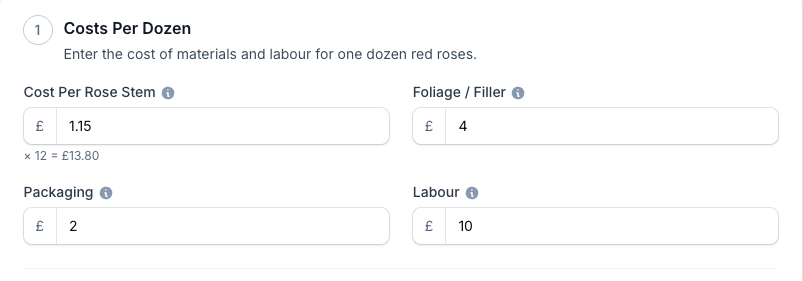
- Cost Per Rose Stem. Type the cost of one stem and the tool multiplies it by 12, shown live under the box.
- Foliage / Filler. The greenery and filler for one dozen.
- Packaging. Wrapping, cellophane, ribbon and box for one dozen.
- Labour. Your time to make up one dozen.
Step 2, VAT & Fees:
- Standard VAT. Pulls from your Business Defaults, and you can change it here for this analysis.
- Flat Rate VAT. Leave it at 0 unless you're on the flat rate scheme. Enter a rate and the results table gains a Flat Rate column.
- Relay Fee. The percentage a wire service deducts, such as 33.33.
- Relay Fixed Fee. Any fixed amount taken per order on top of the percentage. Leave it at 0 if there isn't one.
Set The Price Range And Analyse
Step 3, Price Range: the From, To and Step boxes generate the selling prices to compare. These prices include VAT.
- From 50 to 100 in steps of 10 gives you six price points to read. Every figure uses your account currency.
- The table holds up to 20 price points, so keep your step sensible. A range that would produce more than 20 rows shows a warning instead of a table.
Tap Analyse Profitability to run the numbers.
Read The Results
The results panel leads with Total Cost Per Dozen excluding VAT, then a table with one row per price.
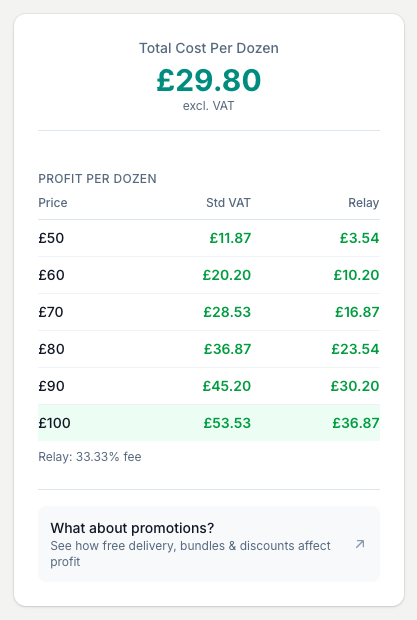
- Price. The selling price for that row, including VAT.
- Std VAT. The profit at that price after standard VAT.
- Flat Rate. Shown only when you've entered a flat rate above.
- Relay. The profit left after your relay fee and any fixed deduction.
Green is profit, red is a loss. The most profitable Std VAT row is highlighted, so the price that clears the most stands out. A note under the table repeats your relay fee percentage and any fixed fee.
Compare Promotions And Scenarios
Tap What about promotions? at the foot of the results, or the Scenario Comparison header, to open the section. It's closed until you open it.
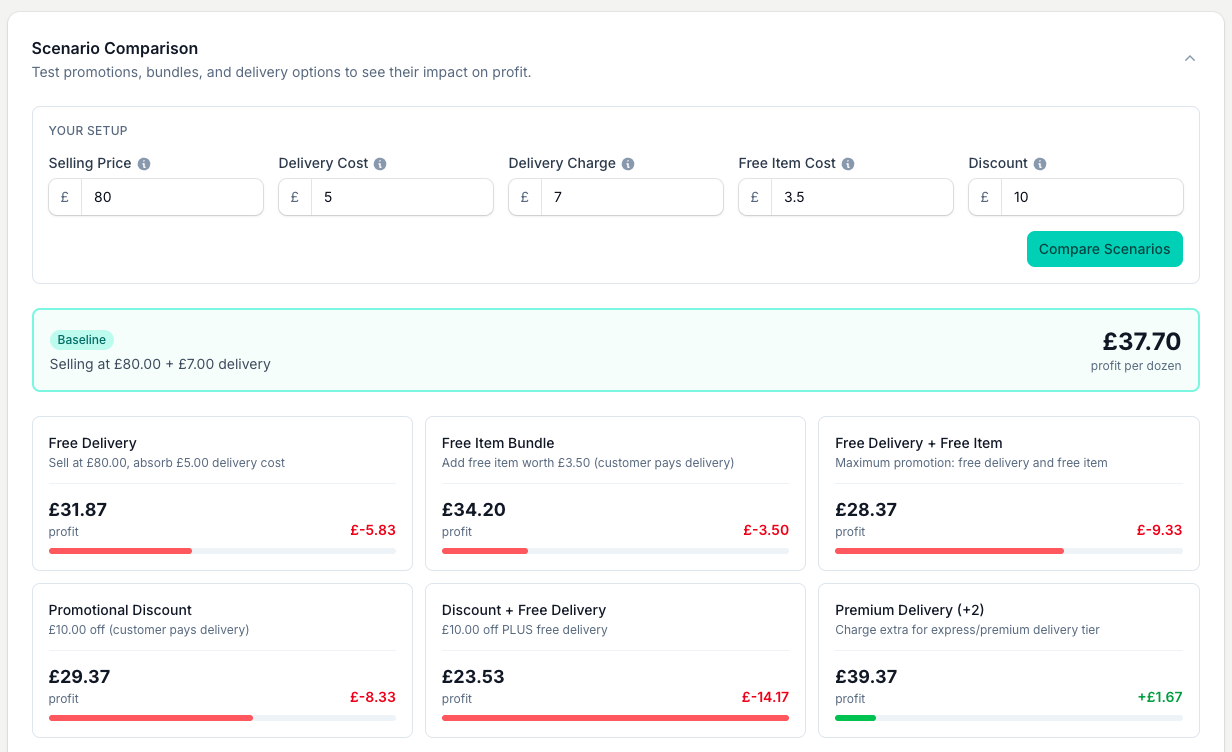
- Selling Price. The price this comparison works from. Left blank, it fills to the middle of your range.
- Delivery Cost. What a delivery actually costs you.
- Delivery Charge. What you charge the customer for delivery.
- Free Item Cost. The cost of an item you'd give away in a bundle.
- Discount. The amount off for a promotion.
Tap Compare Scenarios. You get a Baseline card plus variant cards, each showing the profit and the change against the baseline with a small bar:
- Free Delivery, where you absorb the delivery cost.
- Free Item Bundle, adding a free gift while the customer still pays delivery.
- Free Delivery + Free Item, both together.
- Promotional Discount, money off the price.
- Discount + Free Delivery, the two combined.
- Premium Delivery, charging extra for an express tier.
Use it before you commit to an offer, so you can be generous where it pays and protect your margin where it doesn't.
Setting Your Price
Read your price off the profit table. Pick the price that clears the profit you need at peak, worked out from your own overheads, not the shop down the road. Their rent and wage bill tell you nothing about what you need to charge.
- The gap between the Std VAT and Relay columns is what taking a relay order costs you at that price.
- Run the scenario comparison to check a promotion still leaves a margin you're happy with before you run it.
This tool reads the price decision off the table and the scenarios. To set your markup from your overheads in the first place, work through the Business Markup Calculator. To price one dozen's build in detail, use the Dozen Red Rose Price Calculator.
Save And Print
Save this analysis so you can return to its inputs and results.
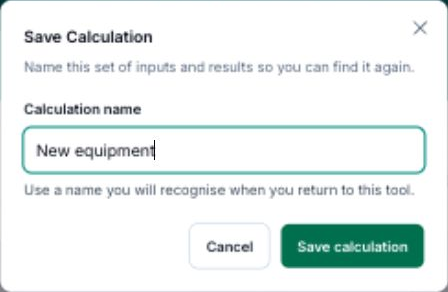
- Tap Save calculation after calculating your result.
- Enter a Calculation name you will recognise.
- Tap Save calculation to keep it.
To reopen saved work, tap View saved, then Use this calculation beside its name.
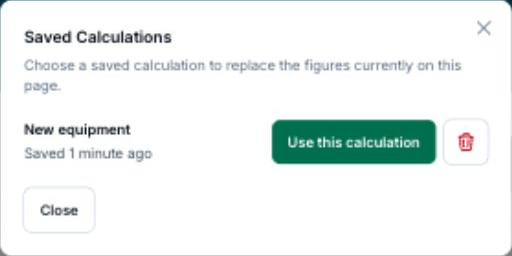
After loading a calculation, Save as new keeps a separate copy.
Tips And Best Practices
- Raise the range ahead of peak. Run higher price points before Valentine's Day and Mother's Day to see what the peak premium is worth.
- Test every promotion first. A free-delivery offer may still leave a healthy margin, or it may not. The scenario comparison shows you which before you commit.
- Revisit when costs move. Rose and wholesale prices shift with the season. A price that worked last season can be eroding your margin now.
- Watch the relay gap. Compare the Std VAT and Relay columns to see the real cost of taking relay orders at each price.
- Keep your step sensible. The table caps at 20 rows, so a wide range needs a bigger step.
Common Questions
Does it handle VAT automatically? Yes. Enter your rates and standard VAT is applied to every row. Enter a flat rate as well and a separate Flat Rate column shows that profit alongside the standard one, so you can compare both.
What does the Relay column mean? The profit left after your relay fee percentage and any fixed deduction. If you make up orders from a wire service, this column shows what you actually keep.
Can I use it for other products? It's built for a dozen red roses. To price a dozen's build line by line, use the Dozen Red Rose Price Calculator. For other products, start with the Arrangement Calculator or the Business Markup Calculator.
How is it different from the dozen rose price calculator? The price calculator works out the cost and price of one dozen's build. This analyser models a whole range of price points and promotions across the peak, so you can see where the profit sits before you set your price.
What's the scenario comparison for? To see an offer's real profit before you commit to it. Rather than guessing whether a promotion is worth it, you read the actual profit for each variation and how it compares to selling at your standard price.
Keep reading
Try it in your own toolbox
Create a free Florist Toolbox account to get started. The tool this guide covers is part of the Plus plan.
Create your free account