
Bouquet Sales Calculator
Work out how many bouquets need to sell before their contribution covers your annual fixed costs.
Use this calculator to turn your annual fixed costs into a clear bouquet sales target. It works from the contribution each bouquet makes towards rent, salaries and the other costs of keeping the shop open.
What Contribution Means
Contribution is the selling price after VAT, less the direct costs that only happen when you sell that bouquet.
For example, a VAT-registered florist sells an average bouquet for 72 in their account currency, including 20% VAT. The selling price excluding VAT is 60. If the flowers, sundries and card fee cost 30, that bouquet contributes 30 towards annual fixed costs.
The calculator would divide 60,000 of annual fixed costs by that 30 contribution. The result is 2,000 bouquets a year.
Contribution is not final profit. It first pays the fixed costs. Contributions from later sales add to profit once those fixed costs are covered.
Avoid Counting Labour Twice
Put annual salaries and other regular wages in Total Annual Fixed Costs. Do not also subtract those wages from each bouquet.
Only include a labour cost under Direct Cost Per Bouquet when that cost happens because you sold one more bouquet. Piece work is one example. This keeps the same wage from appearing on both sides of the calculation.
How To Use It
- Enter Total Annual Fixed Costs. Include rent, rates, annual salaries, insurance, software and other costs that do not rise with each bouquet sold.
- Enter Average Selling Price. Use the till price your customer pays. If you are VAT registered, enter the price including VAT.
- Enter Direct Cost Per Bouquet. Add flowers, sundries, card fees and other costs caused by that sale. VAT-registered florists enter recoverable costs excluding VAT. Non-registered florists enter the amount paid.
- Confirm your VAT setting. The calculator starts with the VAT choice and rate in your business profile. Change them here if this calculation needs a different rate.
- Optionally enter your opening days and hours. This adds daily and hourly targets based on your working schedule.
- Tap Calculate Break-Even.
The result shows the annual bouquet target, then breaks it into monthly, weekly and daily figures. If you entered opening hours, it also shows an hourly pace.
Check Your Inputs
The target is only as useful as the figures behind it.
- Use a selling price that reflects a normal mix of everyday bouquets, not your highest-priced hand-tie.
- Include all fixed wages once under annual fixed costs.
- Include only costs that rise with each bouquet under direct costs.
- Re-run the calculation when rent, wages, flower prices or your average selling price changes.
- Enter your real opening days. Leaving the field blank spreads the target across seven days a week.
The Operating Cost Calculator can help total the fixed costs. Use the Arrangement Calculator to check the costs and selling price for a typical bouquet.
Save Your Calculation
Save this calculation so you can return to its inputs and results.
- Tap Save calculation after calculating your result.
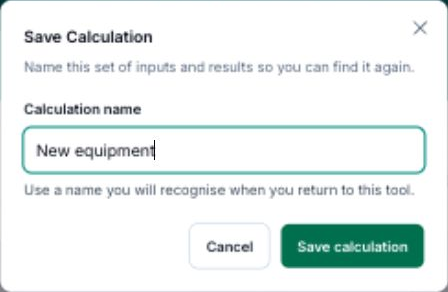
- Enter a Calculation name you will recognise.
- Tap Save calculation to keep it.
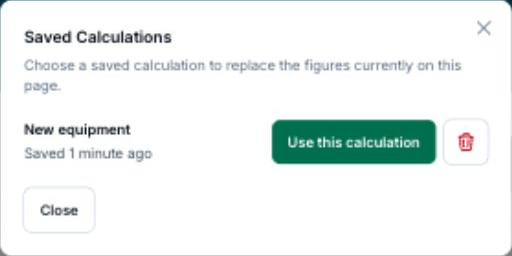
To reopen saved work, tap View saved, then Use this calculation beside its name.
After loading a calculation, Save as new keeps a separate copy.
Common Questions
What if my fixed costs are zero? The calculator returns a valid target of zero bouquets. It does not hide the result or treat zero as an error.
What if direct costs equal the selling price after VAT? The bouquet contributes nothing towards fixed costs, so there is no finite break-even target. Reduce the direct cost, raise the selling price or check the figures you entered.
What counts as a direct cost? Flowers, sundries, packaging, card fees and piece-work labour can be direct costs. Rent and annual salaries are fixed costs and belong in the first step.
What if I sell more than bouquets? Use an average selling price and direct cost that reflect the product mix you want to model. You can also save separate calculations for bouquets, hatboxes and other work.
How does VAT affect the result? VAT-registered florists cannot use the VAT part of a sale to cover fixed costs. The calculator removes VAT from the selling price before working out contribution. Non-registered florists use the full selling price.
Keep reading
Try it in your own toolbox
Create a free Florist Toolbox account to get started. The tool this guide covers is part of the Plus plan.
Create your free account