
True Cost of Employment Calculator
Estimate staff costs from wages, employer contributions, optional holiday cover and overheads.
A new hire costs far more than the hourly wage, and it is the extras that quietly stretch your budget. This calculator takes the wage and hours, estimates employer contributions and adds the optional costs you select. It shows the annual, monthly, weekly and hourly cost of the role. For UK and Ireland staff it also estimates what the employee takes home, so you see both sides of the wage before you advertise the job.
What It Does
Start with the hourly wage and weekly hours. The pay date and employee details determine the contribution estimate. You can also choose extra budgets:
- Employer NI (UK), PRSI (Ireland), or a flat rate you enter (Other)
- Employer pension contributions
- Optional paid holiday cover
- Optional statutory sick pay (Ireland)
- Any other overheads you add as a percentage of the wage
It shows the true total split by year, month, week and hour, with a breakdown of each cost so you can see where the money goes. For UK and Ireland staff it also estimates the employee's take-home pay after income tax, NI or PRSI, USC (Ireland) and pension.
It supports the UK, Ireland and Other. For UK and Ireland staff, a pay date selects the rules in force at that point. Every calculation shows the source and date of the rates it uses.
The Short Version
- Pick your country so the tool uses the right tax rules and currency.
- Enter the wage and hours.
- Add the employer on-costs, such as holiday days and pension.
- Click Calculate True Cost and read the result.
The rest of this guide walks through each step.
Choose Your Country
Start by choosing United Kingdom, Ireland or Other. This sets the tax logic and the labels, so you see NI and £ for the UK, or PRSI and € for Ireland.

Enter The Wage And Hours
Type the Hourly Wage and the Hours per Week. Everything else builds from these two numbers.

Add The Employer On-Costs
This section is where you add the costs that sit on top of the wage.
- Holiday Days. The paid days off per year. These add a separate cover cost only when Add coverage cost for paid holiday days is selected.
- Employer Pension (%). The percentage you contribute as an employer. For UK staff it applies to qualifying earnings; for Ireland and Other it applies to the gross wage.
- Other overheads (%). Optional extra running costs for the role, as a percentage of the gross wage. Leave it at 0 if you have none.
- Employer NI or PRSI. For UK staff the tool works out employer NI from the earnings threshold in the rates it uses, so the rate shown is a guide rather than a figure you change by typing. Ireland calculates PRSI for you. Only when you pick Other does the flat rate you type drive this figure.
For UK staff, Employment Allowance Status records whether the wider payroll is eligible and has claimed. The calculator still shows employer NI before the allowance because the allowance belongs to the whole payroll, not one employee.
The gross wage already covers 52 weeks, including paid leave. Under How we count paid leave in costs, tick Add coverage cost for paid holiday days to add the cost of covering time off on top of the wage. For Ireland you also get Add statutory sick pay cost.
Read Your True Cost
Click Calculate True Cost. The page does not update on its own, so this button is what generates the result.
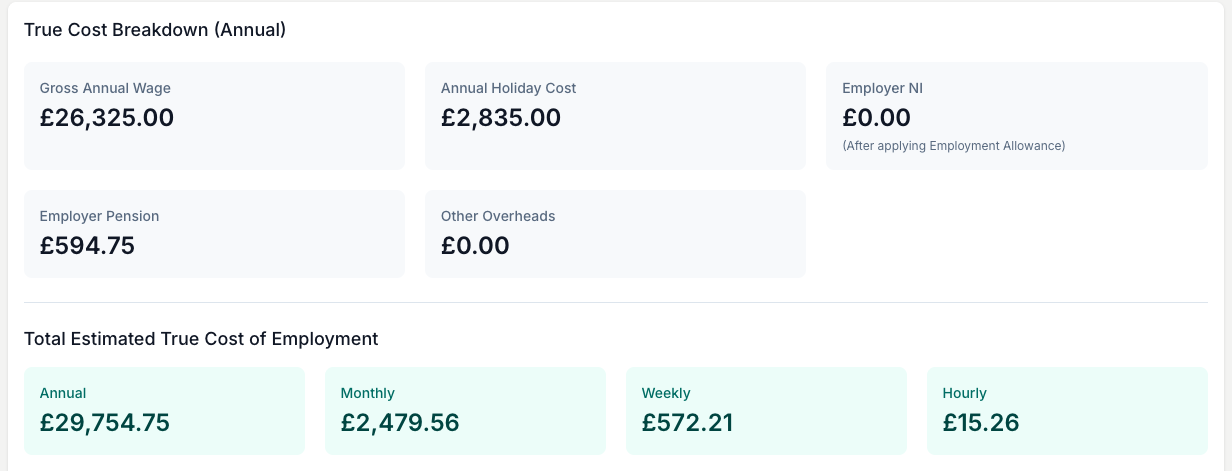
A florist on £13.50 an hour for 37.5 hours a week has a gross wage of £26,325 a year. The true total sits above that once NI, pension, holiday cover and overheads are added, and the per-hour figure is the one to carry into your pricing.
Open How this is calculated to see the working behind each figure. The dated Sources list shows where the rates came from and when, so you can check them against your own HMRC or Revenue guidance. Treat every figure as an estimate that you and your accountant own.
See The Employee's Take-Home
For UK and Ireland staff the tool also estimates net pay, so you see what the wage looks like from the employee's side.
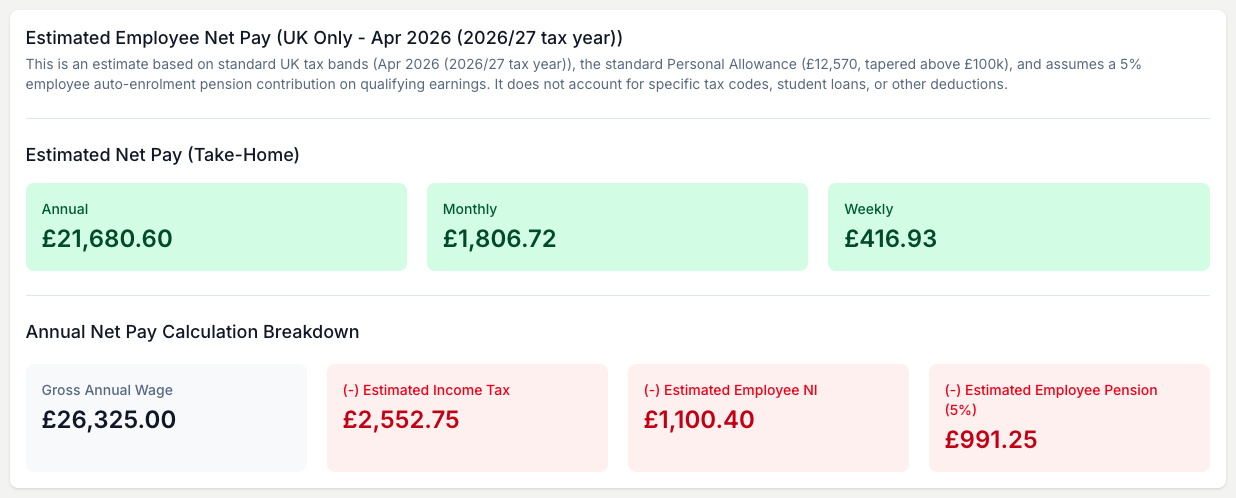
This is an estimate on standard tax bands and assumptions, not a payslip. It does not account for specific tax codes, student loans or other deductions, so hand payroll decisions to your accountant.
Setting Your Price
When you price labour into an arrangement or a quote, use the true hourly cost from this tool, not the wage. The wage alone leaves out the NI, pension, holiday and overheads that the role really costs you.
Anchor your pricing to your own overheads, not the shop down the road. Their rent and wage bill tell you nothing about what you need to charge. Once you know the true hourly cost, feed it into your pricing:
- Use it as the labour rate in the Arrangement Calculator so every quote covers the real cost of making it.
- Set your markup from your overheads with the Business Markup Calculator.
- Include the wage bill in your total overheads with the Operating Cost Calculator.
- Once the wage bill is in your monthly expenses, the Tax Reserve Calculator estimates what to set aside each month for the tax on what is left.
Save To Compare Later
Save one calculation per employee or role type, then reopen it to compare scenarios.
Tips And Best Practices
- Run it before you advertise a role, not after you have made an offer. The true cost may change the rate or the hours you can afford.
- Compare part-time versus full-time. Save both scenarios and see the true annual cost of each.
- Revisit it each year. The tool shows the rate source and date, so check back when Budget changes move NI, pension or wage rates.
- Sanity-check the figures. Open How this is calculated and the Sources list, and compare them against current HMRC or Revenue guidance.
- Feed the true hourly cost into your pricing reviews. If staff costs rise, your prices may need to rise too.
Common Questions
Why is the real cost so much higher than the wage? Employer NI and pension on their own can add a meaningful percentage on top of the wage. Add holiday cover and overheads, and the gap between what an employee earns and what they cost the business grows further.
Do I need to include pension contributions if my employee has opted out? If they have opted out, you do not have to contribute. They can opt back in at any point, though, so it is worth seeing what that would add to your costs.
What if I use self-employed contractors? Contractors are not employees, so most of these costs do not apply. Tax authorities have strict rules on employment status, though, so if a contractor works like an employee they may be treated as one for tax. Check with your accountant.
What does the take-home estimate include? For the UK it takes income tax, employee NI and a 5% employee pension off the gross wage. For Ireland it takes income tax after credits, USC and employee PRSI. It uses standard bands and assumptions, so treat it as an estimate rather than an exact payslip.
Does it use current tax rates? It uses its own saved rates and shows the source and date for each. Check that date against current guidance, and hand any tax decision to your accountant.
Can I model Ireland or seasonal staff? Yes. Pick Ireland, then set the Pay Date and Pay Frequency for that calculation. The result assumes 52 weeks of pay. It can show the cost per paid hour for a shorter-hours role, but it does not work out a short-term contract total from start and end dates.
Can I use this for more than one member of staff? Run it once per employee or role type. If several people are on the same rate and conditions, one calculation covers them all, and you can save each one to return to later.
Keep reading
Try it in your own toolbox
Create a free Florist Toolbox account to get started. The tool this guide covers is part of the Plus plan.
Create your free account